

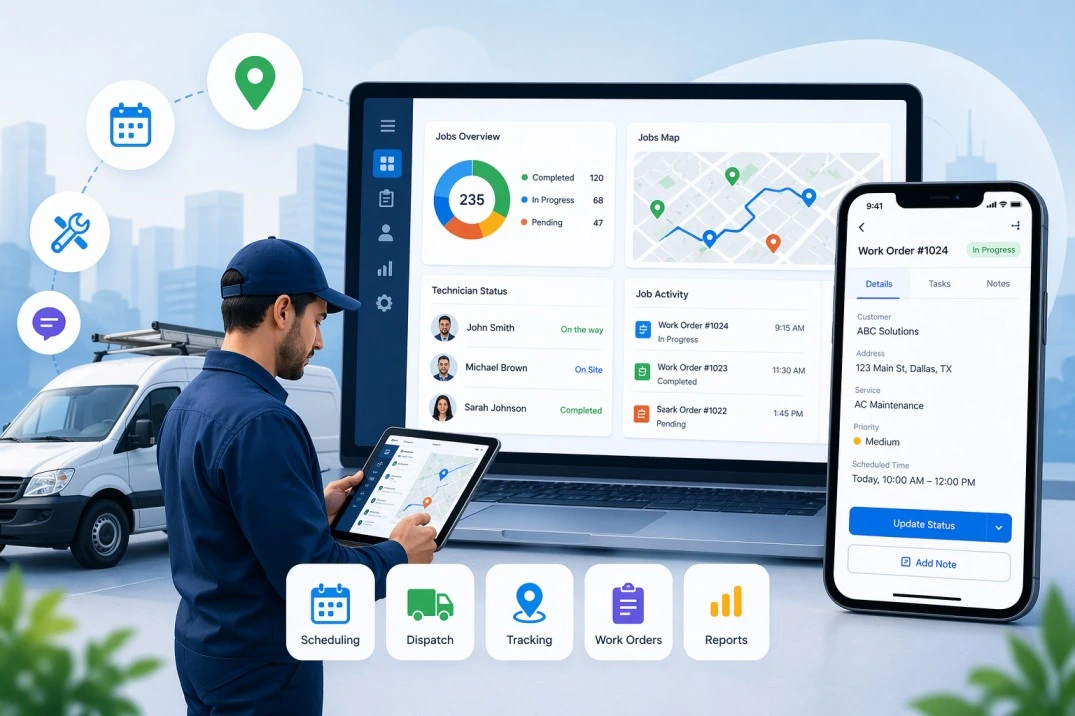
Field service management (FSM) apps are no longer optional for service-based businesses. In 2026, companies use FSM software to manage scheduling, dispatching, field technicians, and customer communication in one system. The best tools now rely on automation, mobile-first workflows, and real-time data to reduce costs and improve service speed.
The market itself shows how critical these tools have become. The global FSM market is valued at around $6.14–$6.26 billion in 2026 and is expected to grow steadily beyond $10 billion in the next few years, driven by automation and mobile workforce demand.
This guide breaks down the best field service management apps in 2026, compares their features, and helps you choose the right one based on real business needs.
What is Field Service Management Software?
Field service management software helps businesses manage operations that happen outside the office. This includes:
- Scheduling jobs
- Dispatching technicians
- Tracking field staff
- Managing work orders
- Handling customer communication
In simple terms, it replaces manual coordination with a centralized digital system.
Why FSM Apps Are Growing Fast in 2026
The shift is not just about technology. It is about efficiency and customer expectations.
Key reasons behind adoption
- Businesses want faster service delivery
- Field teams are now mobile and distributed
- Customers expect real-time updates
- Companies want better visibility and accountability
More than 80% of organizations are increasing automation and digital workflows, which directly drives FSM adoption.
At the same time, trends like AI scheduling, predictive maintenance, and mobile apps are shaping how these tools work.
Key Features to Look for in Field Service Management Apps
Choosing the right FSM software is less about how many features it offers and more about how well those features solve real operational problems. The tools below are the ones that directly impact efficiency, cost, and service quality.
Smart Scheduling and Dispatch
Scheduling is the core of any field service operation. A strong FSM app should automatically assign jobs based on technician availability, skill set, priority level, and location. This reduces manual errors and avoids overbooking or delays.
Advanced tools also support dynamic rescheduling. If a technician cancels or a job runs late, the system adjusts assignments in real time. This improves response time and keeps operations running smoothly.
Mobile App for Field Teams
Field technicians spend most of their time outside the office, so a reliable mobile app is essential. The app should allow them to:
- View assigned jobs and schedules
- Update job status in real time
- Upload photos, videos, and reports
- Capture customer signatures
A well-designed mobile interface reduces paperwork and ensures that all job data is recorded instantly.
GPS Tracking and Route Optimization
Travel time is one of the biggest hidden costs in field operations. FSM software should include GPS tracking to monitor technician locations and optimize routes.
Route optimization helps:
- Reduce fuel costs
- Minimize travel time
- Increase the number of jobs completed per day
Real-time tracking also helps managers respond quickly to delays or emergencies.
CRM and Integration Capabilities
FSM software should not work in isolation. It needs to connect with existing systems like CRM, ERP, accounting, and billing tools.
Integration allows:
- Access to complete customer history
- Automated invoicing and payments
- Better coordination between teams
Without integration, businesses often face data duplication and inefficiencies.
Work Order Management
Work order management ensures that every job is tracked from start to finish. A good FSM system should allow you to:
- Create and assign work orders
- Track progress in real time
- Set priorities and deadlines
- Maintain service history
This improves accountability and ensures that no job is missed or delayed.
Analytics and Reporting
Data plays a key role in improving service operations. FSM apps should provide clear and actionable insights, such as:
- Technician performance
- Job completion rates
- First-time fix rates
- Customer satisfaction trends
These insights help businesses identify bottlenecks and make informed decisions.
Offline Access
Field teams often work in areas with poor or no internet connectivity. FSM apps should offer offline functionality so technicians can continue working without interruption.
Once the connection is restored, the data should sync automatically. This ensures that no information is lost and operations remain consistent.
Why These Features Matter
Each of these features directly impacts operational efficiency. Businesses that implement FSM tools with these capabilities often see:
- Faster service delivery
- Reduced operational costs
- Better customer experience
- Improved team productivity
Instead of focusing on feature quantity, focus on how well these core functions perform in real-world conditions.
Top 10 Field Service Management Apps
1. UpTeams

UpTeams stands out as a practical and modern solution focused on real-world field operations.
Overview:
Designed for businesses managing field teams, inspections, or service operations, UpTeams focuses on simplicity and usability rather than complex enterprise setups.
Key Features:
- Smart task scheduling and assignment
- Real-time tracking of field employees
- Mobile-first interface with offline support
- Easy job updates with photos and notes
- Performance insights and reporting
Why it stands out:
UpTeams focuses on solving everyday operational problems like coordination, delays, and communication gaps. Its mobile-first design aligns with how field teams actually work.
Best for:
Small to mid-sized businesses and growing teams that want a simple, effective FSM system.
2. Microsoft Dynamics 365 Field Service

Overview
Microsoft Dynamics 365 Field Service is a full-scale enterprise solution built for organizations managing complex service operations. It connects field service with CRM, ERP, and Azure cloud services, making it suitable for companies already invested in the Microsoft ecosystem.
Key Capabilities
- AI-driven scheduling engine that assigns technicians based on skills, availability, and job priority
- Connected Field Service (IoT integration) to detect equipment issues and trigger automatic service requests
- Mixed reality support (via HoloLens) for remote assistance and technician training
- Deep integration with Microsoft tools like Dynamics CRM, Teams, and Power BI
What Makes It Different
Unlike simpler FSM tools, this platform focuses heavily on predictive service and connected devices, not just job management.
Best For
Large enterprises in manufacturing, healthcare, telecom, and utilities are already using Microsoft products.
3. Salesforce Field Service

Overview
Salesforce Field Service extends the Salesforce CRM platform into field operations. It is built for businesses that want strong customer relationship management alongside service execution.
Key Capabilities
- Dispatcher console with real-time visibility of jobs and technicians
- AI-powered scheduling (Einstein AI) for optimized job assignments
- Customer 360 integration providing full service history and context
- Mobile app with offline functionality for field technicians
What Makes It Different
Its biggest strength is customer-centric service delivery, where every field interaction is tied to CRM data.
Best For
Mid to large businesses focused on improving customer experience and retention.
4. IFS Cloud Field Service Management

Overview
IFS Cloud FSM is designed for asset-intensive industries where service operations depend on equipment performance and lifecycle management.
Key Capabilities
- Predictive and preventive maintenance tools
- Digital twins and asset tracking
- Advanced workforce scheduling optimization
- Industry-specific modules for energy, aviation, and manufacturing
What Makes It Different
IFS focuses on asset lifecycle management, not just service execution.
Best For
Industries like oil and gas, utilities, aerospace, and heavy manufacturing.
5. ServiceTitan

Overview
ServiceTitan is a specialized FSM platform built for home service businesses such as HVAC, plumbing, and electrical services.
Key Capabilities
- End-to-end job lifecycle management from booking to payment
- Built-in sales tools including estimates and upselling features
- Advanced reporting dashboards for revenue tracking
- Customer call booking and dispatch system
What Makes It Different
It combines FSM + sales + revenue tracking, making it more than just an operations tool.
Best For
Home service companies aiming to scale revenue along with operations.
6. Jobber

Overview
Jobber is designed for small service businesses that need simple and effective field service management without complexity.
Key Capabilities
- Drag-and-drop scheduling interface
- Automated invoicing and online payments
- Client communication and reminders
- Quote-to-job conversion tools
What Makes It Different
Ease of use is its biggest advantage. It requires minimal training and setup.
Best For
Small businesses, freelancers, and startups.
7. Housecall Pro

Overview
Housecall Pro is a mobile-first FSM platform focused on simplifying operations for small and mid-sized service businesses.
Key Capabilities
- Online booking and customer self-service portal
- Automated SMS and email notifications
- Real-time technician tracking via mobile app
- Integrated payment processing
What Makes It Different
Strong focus on customer communication and automation.
Best For
Service professionals who depend heavily on mobile workflows.
8. ServiceMax

Overview
ServiceMax is built for companies managing complex equipment and service contracts. It focuses on maximizing asset uptime and service efficiency.
Key Capabilities
- Asset-centric service management
- Contract and warranty tracking
- Advanced analytics and performance insights
- Integration with ERP systems
What Makes It Different
Strong emphasis on service lifecycle and asset performance.
Best For
Large enterprises with complex service networks.
9. Oracle Field Service

Overview
Oracle Field Service is one of the most advanced FSM platforms, known for its highly accurate scheduling and routing engine.
Key Capabilities
- Time-based, self-learning routing algorithm
- Predictive ETAs and real-time updates
- Capacity planning and demand forecasting
- Mobile workforce management tools
What Makes It Different
Its routing technology is one of the most advanced in the industry, improving efficiency at scale.
Best For
Large organizations with complex logistics and high service volumes.
10. Connecteam

Overview
Connecteam is a workforce management platform that includes FSM capabilities, making it ideal for businesses that need both employee management and field operations tools.
Key Capabilities
- Employee scheduling and shift management
- GPS time tracking and attendance monitoring
- Internal communication tools (chat, updates)
- Task and checklist management
What Makes It Different
It combines HR + workforce + FSM features in one platform.
Best For
Small to mid-sized businesses looking for an all-in-one workforce solution.
Comparison Table: Top FSM Apps in 2026
| Software | Best For | Key Strength |
| UpTeams | Small to mid-sized businesses | Simple, mobile-first field team management with real-time tracking |
| Microsoft Dynamics 365 Field Service | Large enterprises | AI-driven scheduling with deep Microsoft ecosystem integration |
| Salesforce Field Service | Customer-focused businesses | Strong CRM integration with customer-centric workflows |
| IFS Cloud Field Service Management | Asset-heavy industries | Predictive maintenance and asset lifecycle management |
| ServiceTitan | Home service businesses | Combined operations, sales, and revenue tracking |
| Jobber | Small businesses and startups | Easy-to-use scheduling and invoicing |
| Housecall Pro | Mobile-first service teams | Customer communication and automation tools |
| ServiceMax | Large service operations | Asset-centric service management and analytics |
| Oracle Field Service | Enterprises with complex logistics | Advanced routing and predictive scheduling |
| Connecteam | Workforce + field management | All-in-one employee and task management platform |
How to Choose the Right FSM Software
Based on Business Size
- Small businesses → Jobber, UpTeams
- Mid-size companies → ServiceTitan, Housecall Pro
- Enterprises → Microsoft Dynamics, Oracle, IFS
Based on Industry
- HVAC & home services → ServiceTitan
- Manufacturing → IFS, ServiceMax
- Telecom & utilities → Oracle FSM
Based on Budget
- Low budget → Connecteam, Jobber
- Mid-range → UpTeams, Housecall Pro
- High-end → Microsoft Dynamics, Salesforce
Benefits of Using Field Service Management Apps
Field service management software directly impacts how efficiently your operations run. The right system does more than organize tasks. It improves speed, reduces waste, and creates a better experience for both teams and customers.
Faster Job Completion
Manual scheduling often leads to delays, missed appointments, or inefficient routing. FSM apps automate job assignments based on technician availability, location, and skill set. This reduces downtime between jobs and helps teams complete more tasks in a day without increasing workload.
Lower Operational Costs
Field operations involve hidden costs like fuel, overtime, and inefficient resource use. With route optimization and smarter scheduling, FSM tools reduce unnecessary travel and idle time. Over time, this leads to noticeable savings in fuel, labor, and overall operational expenses.
Improved Customer Experience
Customers expect timely service and clear communication. FSM software enables real-time updates, accurate arrival times, and faster issue resolution. Features like automated notifications and service tracking build trust and improve overall satisfaction.
Better Visibility and Control
Without a centralized system, tracking field operations becomes difficult. FSM apps provide a real-time view of technician locations, job progress, and service status. Managers can monitor performance, identify delays, and make quick decisions when needed.
Higher Team Productivity
Technicians often spend time on paperwork, manual reporting, and coordination. FSM tools reduce these tasks by digitizing workflows. With mobile access to job details and reporting tools, field teams can focus more on actual service work rather than administrative tasks.
Read Also: Top 8 Industries That Need Field Staff Management Software
Trends in Field Service Management (2026 and Beyond)
Field service management is evolving with new technologies that focus on automation, data, and smarter decision-making. These trends are shaping how businesses manage field operations.
AI-Based Scheduling
Modern FSM platforms use artificial intelligence to assign jobs more efficiently. Instead of manual planning, AI considers multiple factors like traffic, technician skills, job priority, and availability to create optimized schedules. This improves both speed and accuracy.
Predictive Maintenance
With IoT-enabled devices, businesses can monitor equipment performance in real time. FSM systems can detect early signs of failure and schedule maintenance before breakdowns happen. This reduces downtime and avoids costly emergency repairs.
Mobile-First Platforms
Field teams rely heavily on smartphones. FSM tools are now designed with mobile-first interfaces, allowing technicians to manage tasks, update job status, and communicate directly from the field. This improves flexibility and reduces dependency on office systems.
Data-Driven Decision Making
FSM software collects large amounts of operational data. Businesses are using this data to track performance, identify inefficiencies, and improve service delivery. Insights like job completion rates and technician performance help in making better decisions.
End-to-End Automation
Automation is expanding beyond scheduling. From job creation to invoicing and reporting, many processes are now automated. This reduces manual effort, minimizes errors, and ensures consistency across operations.
These advancements are driving strong growth in the FSM market, with consistent double-digit expansion expected as more businesses move toward digital operations and automation.
Common Mistakes to Avoid When Choosing FSM Software
Selecting the wrong FSM tool can create more problems than it solves. Many businesses focus on surface-level factors and overlook what actually matters in day-to-day operations.
Choosing Based Only on Price
Low-cost tools may seem attractive, but they often lack essential features or scalability. Instead of focusing only on price, consider long-term value, efficiency gains, and return on investment.
Ignoring Integration Requirements
FSM software should work seamlessly with your existing systems like CRM, accounting, and ERP tools. Lack of integration can lead to data silos and extra manual work.
Overlooking Mobile Usability
Field teams depend on mobile apps. If the interface is slow, complex, or unreliable, it will reduce adoption and productivity. Always evaluate how well the software performs on mobile devices.
Not Considering Scalability
Your business will grow, and your software should support that growth. Choosing a tool that cannot handle more users, jobs, or features in the future can lead to costly migrations later.
Skipping Real-World Testing
Many businesses rely only on demos or sales pitches. It is important to test the software in real scenarios, involve field teams, and understand how it performs in daily operations before making a decision.
Conclusion
Field service management apps are now essential for businesses that rely on field operations. The right tool can reduce costs, improve efficiency, and deliver better customer service.
Among all options, UpTeams stands out as a strong choice for businesses looking for a simple, practical, and modern FSM solution without the complexity of enterprise systems.
If your goal is better scheduling, real-time visibility, and smoother field operations, investing in the right FSM software is no longer optional. It is a direct step toward growth and efficiency.



Leave a Reply