Hostinger and GoDaddy are two hosting companies that show up almost everywhere when you’re looking for a place to host a website. At first glance, they seem similar. Both offer shared hosting, WordPress hosting, domains, email, and website-building tools. But once you dig into the details, the differences become hard to ignore.
After comparing their pricing, performance, features, and overall value, it’s clear that one provider offers considerably more for the money. The question is whether those advantages matter for the type of website you’re building.
Quick Comparison: Hostinger vs GoDaddy at a Glance
| Feature | Hostinger | GoDaddy |
| Starting Price | ~$2.99/month | ~$5.99/month |
| Free Domain | Yes (1st year) | Yes (select plans) |
| Free SSL | Yes, unlimited, all plans | First year only |
| Free Business Email | Yes, included | Trial only |
| Websites on Entry Plan | Up to 3 | 1 only |
| Control Panel | hPanel (custom) | cPanel |
| Daily Backups | Business plan and above | All plans |
| Phone Support | No | Yes |
| PCI Compliance | No | Yes |
| Best For | Beginners, bloggers, small businesses | cPanel users, domain managers, eCommerce |
A Quick Background on Both Providers
What Is Hostinger?
Hostinger has been around since 2004 and now serves over 3 million users across the globe. It is known for keeping prices low without cutting corners on performance. The platform runs on LiteSpeed servers, uses its own custom control panel called hPanel, and is designed to be approachable for people who are new to web hosting.
It has grown fast over the years, mostly because it bundles a lot of what other hosts charge extra for, like SSL, business email, and domain names, into every plan.
What Is GoDaddy?
GoDaddy is one of the oldest names in the hosting space and the world’s largest domain registrar, managing over 84 million domains. It offers hosting, domain registration, a website builder, and business email all under one roof.
The brand is well-known, partly because of heavy marketing over the years. It is a popular first choice for many users who discover it when registering a domain name. However, popularity does not always mean best value, and that is where things get interesting in this comparison.
Pricing: Where Does Your Money Actually Go?
This is the most important section for most people, and the gap here is bigger than you might expect.
Hostinger Pricing
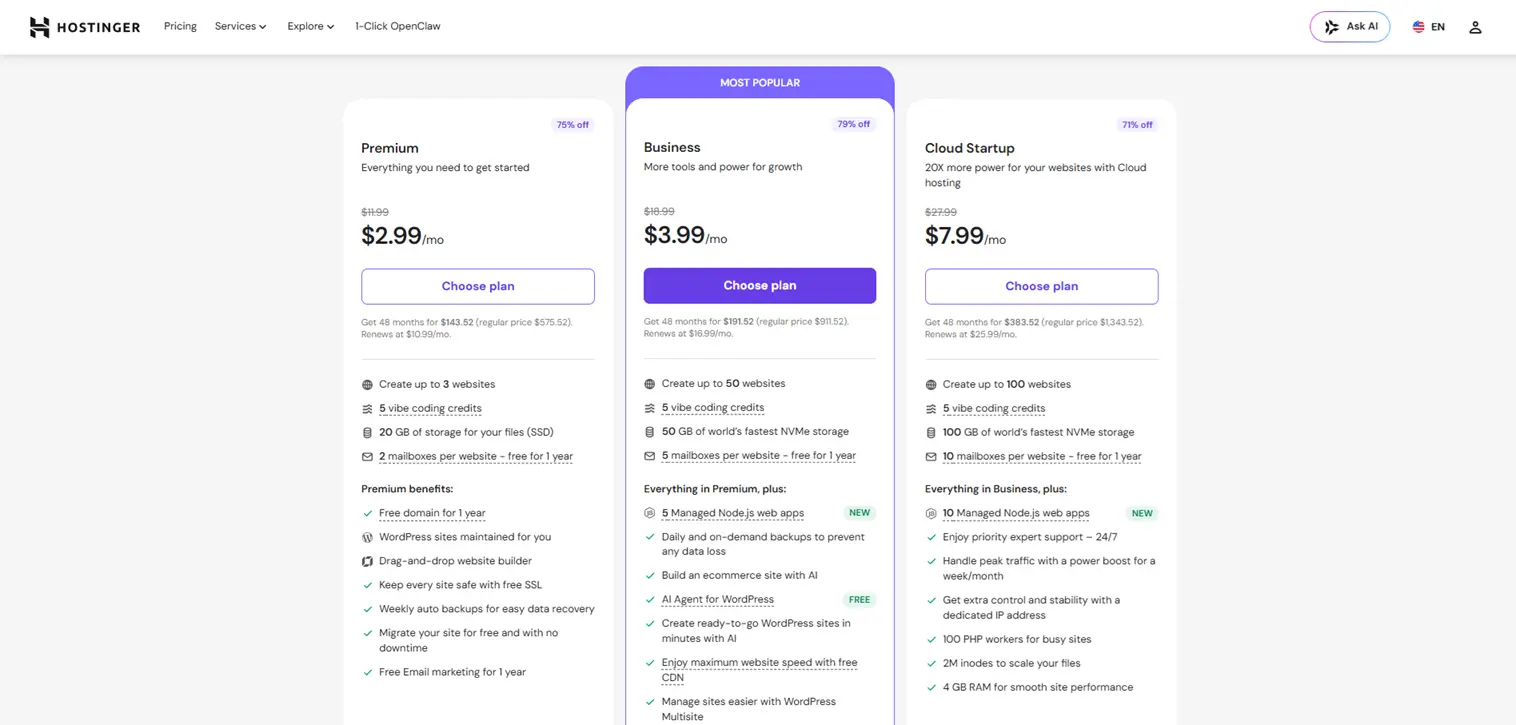
Hostinger’s Premium shared hosting plan starts at around $2.99 per month and lets you host up to 3 websites. It also includes two free business email accounts per website, unlimited free SSL certificates, and a free domain for the first year.
The Business plan unlocks more storage, daily backups, and priority support. Even the Cloud Startup plan, which supports up to 100 websites, is priced far below what GoDaddy charges for far fewer websites.
To get these low prices, you do need to commit to a 24-month or 48-month term. That is standard across most hosting providers.
GoDaddy Pricing
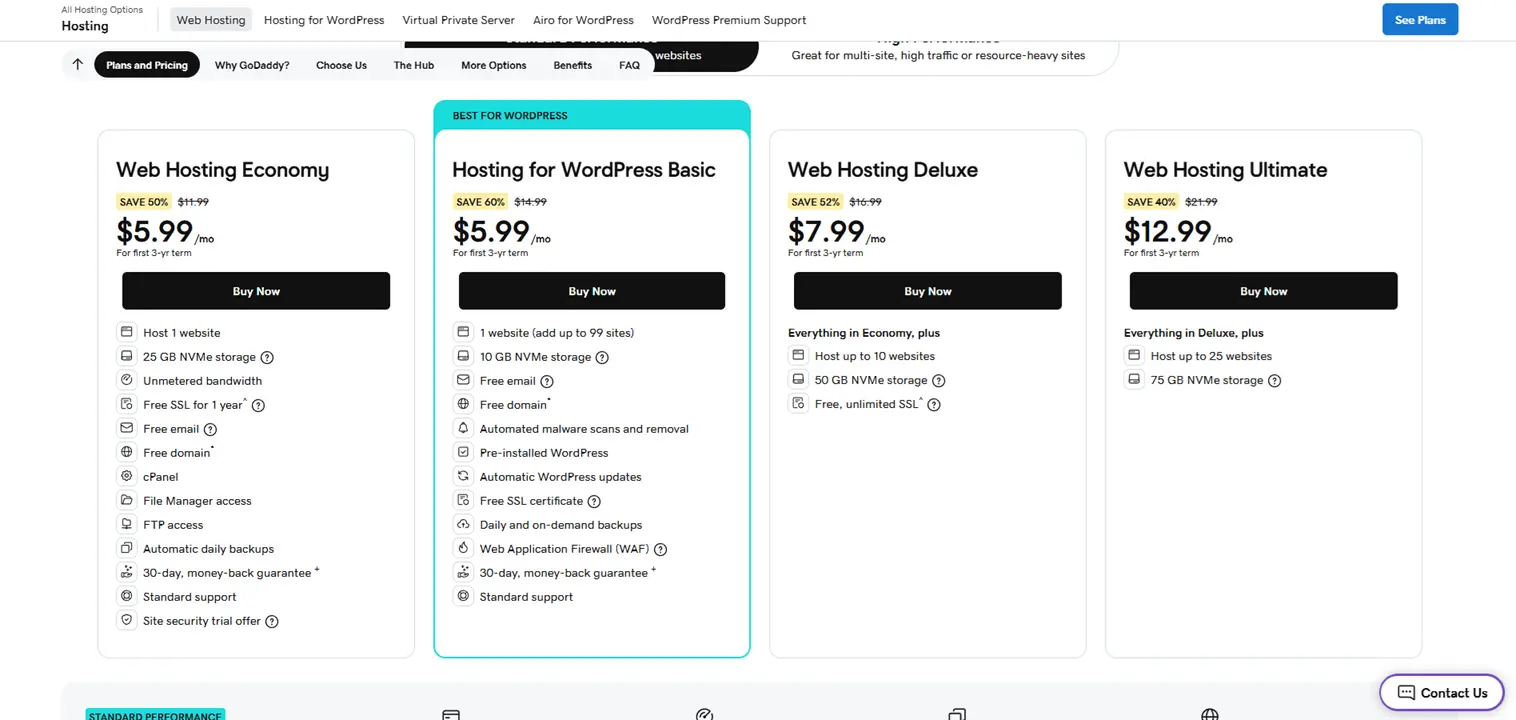
GoDaddy’s entry plan, the Economy plan, starts at around $5.99 per month, and it only supports one website. That alone is a significant limitation compared to Hostinger at a lower price point.
On top of that, the free SSL on GoDaddy’s entry plan runs out after the first year and renews at around $199.95 per year. The business email is only a trial. So what looks like an “included” feature list on paper quickly becomes a list of things you have to start paying for.
The Hidden Costs Problem
GoDaddy upsells aggressively. Things like DDoS protection, advanced security tools, and email hosting, which come bundled with Hostinger, are sold separately at GoDaddy. Once your introductory pricing ends, renewal costs with GoDaddy can jump noticeably.
With Hostinger, what you see is largely what you get. The free SSL stays free. The email stays included. There are no big surprises at renewal.
Stat: According to WebsitePlanet, GoDaddy’s entry-level plan costs more than triple the price of Hostinger’s comparable plan once promotional periods end.
Features Side by Side: What Do You Actually Get?
Beyond the price tag, the feature difference between these two is significant at the entry level.
Where Hostinger Clearly Leads
Hostinger’s Premium plan allows you to host up to 25 websites from day one. The Business plan allows up to 50, and the Cloud Startup plan goes all the way to 100. You also get unlimited free SSL certificates across all plans, permanently. No trials, no annual fees.
Free business email is included, not just as a trial. You can manage everything from one clean dashboard, and Cloudflare integration is available on most plans for better speed and security worldwide.
Hostinger also offers a WordPress vulnerabilities scanner at no extra cost, something GoDaddy makes you pay for separately. For WordPress users, this is a meaningful difference.
Another detail that is easy to miss: Hostinger supports 0% transaction fees on eCommerce websites. GoDaddy does not match this on standard hosting plans, which matters if you plan to sell products online.
Where GoDaddy Has the Edge
GoDaddy includes daily automatic backups on all its plans, including the cheapest one. Hostinger only offers weekly backups on its entry plan and steps up to daily on the Business plan. For websites that update frequently, such as active blogs or news sites, daily backups are genuinely useful.
GoDaddy also gives you access to cPanel, which many experienced developers and agencies prefer because it is the industry standard and they already know how to use it.
One important point that most comparison articles skim past or skip entirely: GoDaddy is PCI compliant. Hostinger is not.
PCI compliance is a requirement for websites that want to accept credit card payments directly without a third-party processor. If you plan to run an online store and want customers to check out using their card directly on your site, GoDaddy supports that. Hostinger does not. You would need to route payments through Stripe, PayPal, or Square instead.
For most bloggers and small business websites, this is a non-issue. But for eCommerce stores that want direct payment processing built into their checkout, it is worth knowing upfront.
Stat: According to AllAboutCookies, because Hostinger is not PCI compliant, eCommerce sites that want to process credit card payments directly need to use a third-party processor like Stripe, PayPal, or Square, or consider GoDaddy instead.
Speed and Performance: The Numbers Tell a Clear Story
This is where Hostinger separates itself most dramatically from GoDaddy.
Server Technology
Hostinger uses LiteSpeed web servers across all its plans. LiteSpeed is faster and more efficient than Apache, and it comes with built-in caching. Your pages load quicker without any extra configuration on your end.
GoDaddy uses Apache servers, which are older and slower. Caching is not prominently offered on basic GoDaddy plans, and when it is available, it requires additional setup.
Real Load Time Test Results
Independent testing by WebsitePlanet recorded Hostinger’s average page load time at 0.8 seconds in GTmetrix tests, making it one of the fastest shared hosting providers they have tested. GoDaddy’s average came in at 2.94 seconds, with a best recorded time of 2.2 seconds.
That is a significant gap. Page speed is a direct Google ranking factor. Users abandon slow websites within seconds, and a three-second load time can cost you visitors, conversions, and search rankings.
Uptime Results
Hostinger recorded 100% uptime during multiple independent testing periods. GoDaddy recorded 99.974% uptime, which is acceptable but came with some noted drops in availability during testing.
Both providers advertise a 99.9% uptime guarantee. In real-world results, Hostinger consistently performs better.
Stat: According to independent testing by WebsitePlanet conducted over several months, Hostinger’s GTmetrix average load time of 0.8 seconds placed it among the fastest shared hosting services tested, while GoDaddy averaged 2.94 seconds during the same testing period.
Ease of Use: Which One Is Simpler to Manage?
Hostinger’s hPanel
Hostinger does not use cPanel. Instead, it built its own dashboard called hPanel. When you first log in, the layout is clean and uncluttered. The icons are large and clearly labeled. Everything you need, from domain management and email setup to WordPress installation and billing, is accessible from one screen.
For someone setting up their first website, this kind of clarity removes a lot of friction. You are not hunting through nested menus or decoding technical jargon. Hostinger also includes a built-in AI website builder called Kodee, which helps beginners launch a website using simple text prompts.
GoDaddy’s Dashboard
GoDaddy’s interface has improved significantly over the years. It now features a cleaner design with better navigation. You also get access to cPanel, which is familiar to experienced developers and agencies who have used traditional hosting before.
The main downside is that GoDaddy’s interface includes frequent upsell prompts and ads for additional services. It can feel pushy when all you want to do is manage your website. Experienced users who know how to navigate around the noise will be fine, but beginners may find it distracting.
My Personal Experience Using Hostinger
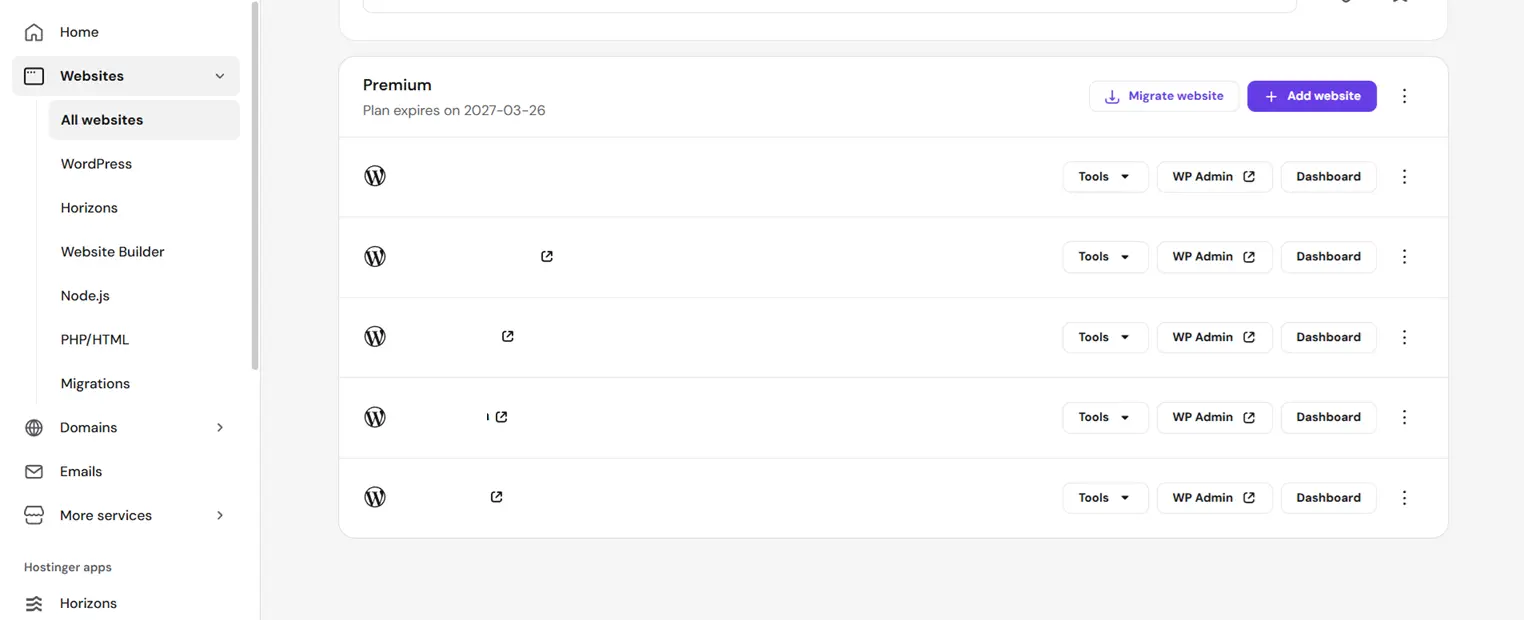
I have been using Hostinger to host 100 websites on a single plan, and the experience has been smooth from start to finish.
Setting everything up took far less time than I expected. The hPanel made it easy to manage all the websites from one place without feeling overwhelmed. I did not need to jump between separate dashboards or log into different accounts for different sites.
One thing that stood out immediately was everything that came included without extra charges. I got a free domain in the first year, which removed an additional cost I was expecting to pay separately. The free business email was already part of the plan, so I did not need to sign up for Google Workspace or any other external email service to get a professional address.
The free SSL certificates were active instantly across all websites. No manual configuration, no waiting for approvals, and no annual renewal fees showing up later.
When I had questions, the live chat support team was quick to respond and actually understood the issues I raised. That level of technical competence is not something every hosting company delivers consistently.
The biggest surprise was how well performance held up across 100 websites simultaneously. Pages loaded fast, and I experienced zero unexpected downtime during the period I have been running these sites.
For the price, nothing I have used before comes close to the value Hostinger delivers at this scale.
Customer Support: Getting Help When You Need It
Hostinger Support
Hostinger offers 24/7 live chat support. There is also the Kodee AI assistant for quick self-service answers. For more involved problems, a ticketing system and an extensive library of tutorials are available.
The main gap is phone support. Hostinger does not offer it. If you strongly prefer talking to someone directly, that is a real limitation to be aware of.
GoDaddy Support
GoDaddy offers 24/7 phone support, live chat, and text support. For users who are less comfortable with written communication or dealing with time-sensitive issues, phone support is a meaningful advantage.
GoDaddy also has large community forums and detailed documentation. The range of support options is broader than what Hostinger offers.
Security: Keeping Your Website Protected
Hostinger Security
Every Hostinger plan includes free SSL certificates permanently, DDoS protection, malware scanning, a firewall, and Cloudflare integration on most plans.
Hostinger also holds an ISO/IEC 27001:2017 certification, which is a formal international standard for information security management. Not every hosting provider pursues this kind of certification.
As mentioned in the features section, the WordPress vulnerabilities scanner is included free of charge and scans your WordPress installation for known weaknesses before they become problems.
The one gap: no PCI compliance. Websites that need to process card payments directly will need a third-party payment gateway.
GoDaddy Security
GoDaddy includes standard security tools such as DDoS protection, a Web Application Firewall, and malware scanning. It also offers a website cleanup and repair tool, which can help restore a hacked or compromised site faster.
A useful feature GoDaddy offers is customizable scan frequency. Depending on your plan, you can set malware scans to run every 30 minutes, every 12 hours, or once daily. This kind of control is useful for high-traffic websites or business-critical applications.
GoDaddy is also PCI compliant, which is important for direct payment processing.
What Most Comparison Articles Do Not Tell You
After reviewing the top-ranking articles on this topic, a few things get missed or glossed over that are worth knowing before you decide.
The PCI compliance issue is often buried. Most articles mention it in a footnote, if at all. But for eCommerce sites that want to process card payments directly without routing through a third party, this is a deciding factor, not a minor detail.
GoDaddy’s daily backups on all plans is a real advantage. Hostinger’s weekly backup schedule on the entry plan is a limitation that gets underplayed. If your website updates frequently, daily backups are meaningful, and GoDaddy includes them even on the cheapest plan.
Domain registration pricing is different between the two. Registering a .com domain through Hostinger costs around $38 for three years. Through GoDaddy, the same registration costs around $43.99. Over a large domain portfolio, that difference adds up.
Hostinger’s 0% transaction fee for eCommerce is rarely highlighted. If you run an online store hosted on Hostinger, you pay zero transaction fees. This is a significant saving over time for stores with high sales volume.
Hostinger vs GoDaddy Reddit Reviews
While performance tests and feature comparisons tell part of the story, it’s also useful to look at feedback from website owners who use these hosting providers every day.
Across multiple community discussions, Hostinger is frequently praised for its affordable pricing, fast loading speeds, and beginner-friendly dashboard. Many users report that it offers excellent value for small business websites, blogs, and WordPress projects. Users also appreciate the number of features included at lower price points compared to competing hosts.
GoDaddy receives positive feedback for its phone support, familiar cPanel environment, and extensive ecosystem of products and services. Some users prefer GoDaddy because they can manage domains, email, and hosting from a single provider.
However, community discussions also highlight a few recurring concerns. Hostinger users occasionally mention higher renewal pricing after promotional periods end, while GoDaddy users often point to upsells and the additional cost of features that are included with some competing hosts.
Overall, the community sentiment tends to favor Hostinger for performance and value, while GoDaddy remains a popular choice for users who prioritize phone support, traditional hosting tools, and an all-in-one platform experience.
Here is the reddit discussion links:
- Hostinger vs GoDaddy – which one is better for non technical users?
- I’ve seen a lot of complaints about Hostinger and GoDaddy lately. Can anyone recommend the best web hosting alternatives available right now?
- Hostinger or GoDaddy? Which one is better?
Who Should Choose Hostinger?
Hostinger is the right choice for most website owners who want strong performance, generous features, and a low price without any hidden costs down the road.
It works best for bloggers, content creators, small business owners, freelancers, and developers managing multiple websites at once. If you are launching your first site or scaling a portfolio of projects, Hostinger gives you the most for your money.
It is also a strong match for WordPress users who want fast load times and built-in optimization without extra configuration.
Who Should Choose GoDaddy?
GoDaddy makes more sense if you are an experienced developer who specifically needs cPanel and is already comfortable with traditional hosting workflows.
It also suits online store owners who want PCI-compliant hosting with direct credit card payment processing built in. And if phone support is a priority for you, GoDaddy offers it while Hostinger does not.
If you already manage a large domain portfolio through GoDaddy’s domain registrar, consolidating your hosting there as well can simplify billing and management.
FAQs On Hostinger vs GoDaddy
For most users, Hostinger is a better choice because it offers lower pricing, faster performance, free SSL certificates, free business email, and support for multiple websites on entry-level plans. GoDaddy is better suited for users who prefer cPanel, phone support, or PCI-compliant hosting.
Hostinger is significantly cheaper than GoDaddy. Hostinger’s shared hosting plans start at a lower price and include features such as free SSL, free email, and a free domain, while GoDaddy often charges extra for some of these services after the introductory period.
Yes, Hostinger is generally faster than GoDaddy. Hostinger uses LiteSpeed web servers and built-in caching technology, which typically result in faster page loading times and better overall website performance.
Hostinger is often considered the better option for WordPress users due to its optimized WordPress hosting, LiteSpeed servers, WordPress acceleration features, and affordable pricing. However, GoDaddy remains a solid choice for users familiar with its ecosystem.
Yes, Hostinger provides free SSL certificates on all hosting plans, and they remain free for the lifetime of the hosting account. GoDaddy offers free SSL on some plans, but additional charges may apply after the initial period.
Yes, you can easily migrate your website from GoDaddy to Hostinger. Hostinger offers free website migration services for many hosting plans, making the transfer process simple for beginners.
Hostinger is generally better for small businesses because it provides excellent performance, affordable pricing, free business email accounts, and strong security features. GoDaddy may be a better fit for businesses that need phone support or direct PCI-compliant payment processing.
GoDaddy has an advantage in customer support because it offers 24/7 phone support in addition to live chat. Hostinger provides 24/7 live chat support and an AI assistant but does not offer phone support.
Both providers can host eCommerce websites, but the best choice depends on your needs. Hostinger is ideal for online stores using payment processors like Stripe or PayPal, while GoDaddy may be a better option for businesses requiring PCI-compliant hosting for direct credit card processing.
Most beginners should choose Hostinger because it is more affordable, easier to use, and includes valuable free features such as SSL certificates, email hosting, and a free domain. Its user-friendly hPanel also makes website management simple for new users.
Final Verdict: Hostinger Wins
After comparing pricing, speed, features, security, and ease of use, Hostinger comes out ahead for the vast majority of website owners.
It is faster, cheaper, and gives you more from day one. The permanently free SSL, included business email, free first-year domain, and support for up to 25 websites on the entry plan make it an extremely strong option at every budget level.
My own experience running 100 websites on a single Hostinger plan confirmed what the numbers already show: the value is real, and the performance holds up.
GoDaddy is not a bad hosting provider. It earns its place for users who specifically need cPanel, direct PCI-compliant payment processing, or phone support. But for the typical blogger, small business owner, or anyone managing multiple websites, GoDaddy charges more for less.
If you are starting fresh, switching from a pricier host, or looking to simplify your web presence without overspending, Hostinger is the smarter move in 2026.
For more honest web hosting comparisons and tech guides, keep reading at Tech Wire Global.